VLC for Android
- 4.1
- Rating
- 500.00M
- Installs
- Free
- Price

 Analysis by App-foxy
Choosing a mobile video player is less about finding the flashiest interface and more about avoiding the moment when a file refuses to play, the audio drifts out of sync, or a subtitle sits in the wrong place. I spent time using VLC for Android with that practical question in mind: can it become the one player I keep installed, or is it better treated as a specialist tool? My answer is fairly clear. It is a strong choice for people who keep their own video and music files, move media between devices, or dislike being pushed toward a particular streaming service. It is less convincing for someone who wants a polished streaming hub with recommendations, subscriptions, and a tightly curated library.
Developed by Videolabs, this free app belongs to the video players and editors category, although its real role is playback rather than editing. Its reputation is easy to understand: the project is open source, it has been available since February 4, 2015, and it has reached over 100 million installs. That scale does not make it perfect, but it does suggest that VLC for Android has become a familiar fallback for people who want broad media compatibility without paying for a separate player.
How I would decide whether VLC belongs on your phone
My first decision criterion is where your media comes from. If nearly everything you watch arrives through a streaming app, VLC may not change your routine much. Streaming services usually handle discovery, accounts, watch progress, and recommendations better. VLC matters more when your files are stored locally, copied from a computer, received from another person, or kept on removable storage. In those situations, a neutral player is often more useful than an app built around one catalog.
You May Also Like

 Blood Strike: 2.5 Anniversary
Blood Strike’s Loadouts Turn Every Drop Into a Tactical Gamble
A close look at Blood Strike’s custom loadouts: how fast access to signature weapons reshapes its battle royale rhythm, rewards preparation, and narrows the gap between fights.

 Pandora - Music & Podcasts
Pandora’s Music Is Easy to Start, but Harder to Recover
Pandora’s strength is its low-effort path from a seed to a station. Its weak spot is how much confidence it asks you to place in connection, setup, and quiet recovery.

 8 Ball Pool
8 Ball Pool Is Built on Rivalries, Rematches, and Routine
A close look at the rivalries, rematches, shared routines, and unanswered safety questions that turn a quick pool match into a persistent mobile community.

 Samsung Music
Samsung Music’s Quiet Strength Is Playing What You Already Own
Its reach comes less from spectacle than from dependable access to a personal library. That simplicity is both the app’s strongest retention engine and its ceiling.

 AccuWeather: Weather Radar
AccuWeather Review: A Quick, Clear Forecast for Everyday Decisions
For everyday plans, the best forecast is the one you can understand quickly. AccuWeather makes rain timing, radar, and local conditions easy to act on, with a few trade-offs.

 Hill Climb Racing
Why Hill Climb Racing Still Turns Crashes Into One More Run
A tiny car, a bumpy hill and one more upgrade: Hill Climb Racing keeps resurfacing because its simple chaos makes every near-miss feel personal.
More From Our News Desk



The second criterion is control. I look for a player that lets me choose the file, audio track, subtitle, playback position, and viewing style without turning every choice into a separate purchase or account decision. VLC generally feels designed around that kind of direct use. I can open a file and concentrate on watching it instead of first organizing my viewing habits around a service.
The third criterion is tolerance for mixed media. A phone may contain short clips, downloaded lessons, concert recordings, podcasts, films, and music albums, all arranged differently. A player that works well for only one type of content quickly becomes another app to manage. VLC’s appeal is that it treats video and music as parts of the same personal media collection, while still allowing me to browse them separately when that is more convenient.
I would also consider how much patience you have for setup. VLC is not difficult, but it gives me more choices than a very simple player. That is a benefit when I need control and a small burden when I only want to tap a video and forget about settings. The best choice depends on whether you see those controls as useful tools or unnecessary furniture.
What everyday playback feels like
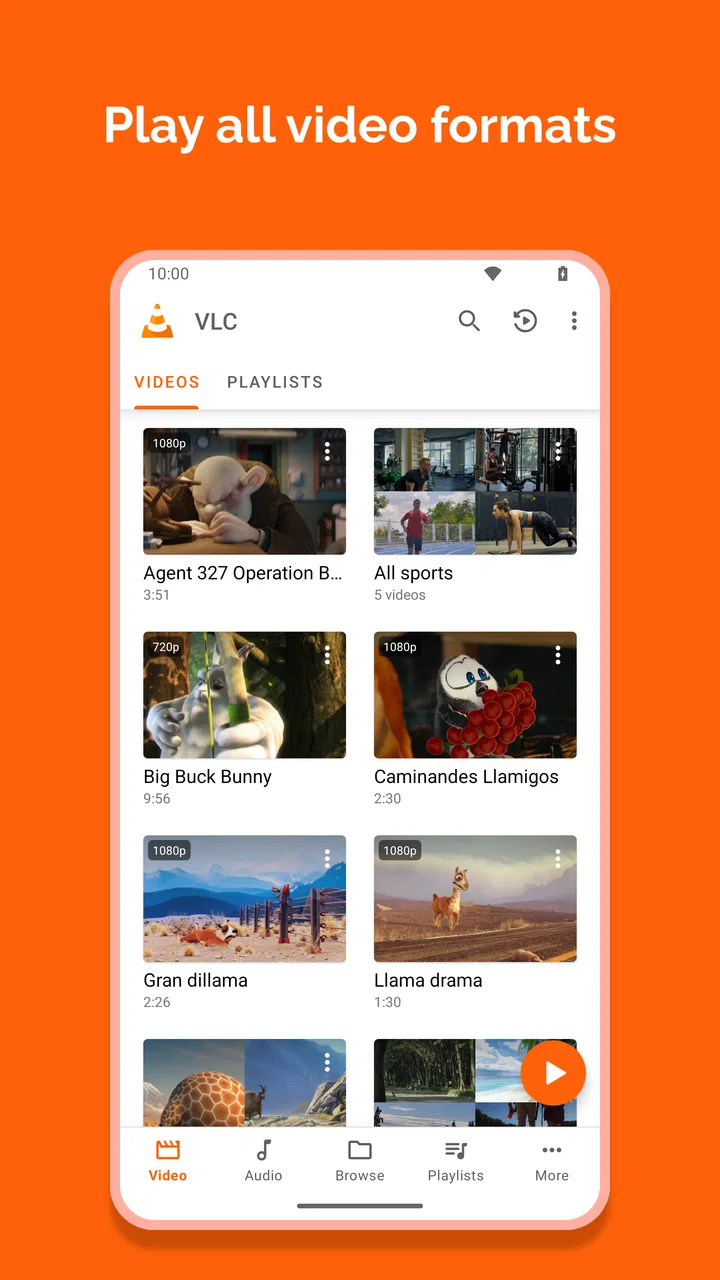
In ordinary use, I found the basic workflow refreshingly direct. I can browse the media available to the app, choose a video, and start watching without building a playlist first. The same general approach works for music, so I do not need one player for clips and another for audio files. This makes it especially handy after transferring a group of recordings from a computer or receiving several files in a chat.
A realistic example is a long train journey. I might copy a few films, language lessons, and albums to my phone before leaving home. With a streaming-first app, that preparation can involve separate services, different download rules, and several places to remember. VLC gives me one local playback destination. I still have to obtain and organize the files myself, but once they are on the device, the viewing process is uncomplicated.
The same advantage appears with personal recordings. Family videos, camera footage, and older files often do not belong to a streaming library. VLC is useful because it does not ask me to turn those files into a public collection or upload them to a service before I can watch them. For private media, that straightforward relationship between file and player is one of its strongest qualities.
Why it wins against many ordinary mobile players
VLC for Android is at its best as a flexible local media tool. I would choose it over a basic built-in player when I expect to handle different kinds of files or switch between video and music regularly. The open-source identity also matters to users who prefer software that is not tied to a single commercial media ecosystem. It does not automatically make every experience smoother, but it supports the feeling that the app is there to play my media rather than redirect my attention elsewhere.
Another practical strength is its broad-minded approach to playback controls. When I watch a film or a lecture, small adjustments can make a real difference: changing the audio track, selecting subtitles, altering the viewing mode, or jumping to a different point without leaving the player. These are not glamorous features, but they are the controls I miss most when a simpler app assumes that every file is perfectly prepared.
VLC also works well as a troubleshooting player. If a video behaves strangely in the phone’s default application, I can try opening it here before converting the file or searching for another solution. I do not treat that as a guarantee that every file will work flawlessly. I treat it as a sensible second opinion that can save time when the problem is the player rather than the recording.
For music, the benefit is different. I like having a single place for albums, spoken recordings, and video files without needing to maintain separate accounts. Someone who keeps a personal collection may appreciate that simplicity more than the elaborate discovery screens found in many music services. VLC is not trying to replace the social and recommendation features of those services; it is useful precisely because it does not depend on them.
Small techniques that make the app more useful
One habit I recommend is using VLC as a staging area for media that I only need temporarily. Instead of importing every file into a permanent library, I can keep a folder of travel videos, work recordings, or study material and use the player to review it. After the project or trip, deleting the folder is easier than cleaning up a collection that has been mixed with everything else.
A second useful approach is to separate media by purpose before opening the app. VLC can play many kinds of content, but a little folder discipline makes browsing much faster. I create simple groups such as “watch later,” “lessons,” or “family clips,” rather than relying on a long undifferentiated list. This is not a flashy feature; it is a workflow improvement that prevents VLC’s flexibility from turning into clutter.
Subtitles are another area where a little preparation pays off. When I keep the subtitle file alongside the matching video and use clear, matching names, the viewing experience is usually less frustrating than hunting through unrelated folders. If I am preparing a film for offline viewing, I test the subtitle before leaving home. That small check is more valuable than discovering during a flight or commute that the timing or language is not what I expected.
I also use the player to compare files before deciding which one to keep. For example, if I have several versions of a recording, I can check the picture, sound, and subtitle behavior directly rather than judging only by filenames. This turns VLC into a practical inspection tool, not merely a button for starting playback.
Where another kind of app may fit better
The biggest limitation is that VLC is not a complete entertainment service. If you want recommendations, editorial collections, synchronized subscriptions, or a polished “what should I watch tonight?” experience, a dedicated streaming app is usually the better fit. Those services are built around discovery and licensed catalogs. VLC is built around media you already have, so comparing them only by interface misses the point.
A phone manufacturer’s default player may also be preferable for very casual users. If you watch only short camera clips and never touch subtitles, alternative audio tracks, or downloaded files, VLC’s broader control set may feel unnecessary. The default app is often closer to the camera roll and may require fewer decisions. I would not install VLC simply because it is well known; I would install it because my media habits justify it.
Dedicated music players can be stronger for listeners who need a deep library-management system, extensive tagging tools, or a carefully designed queue. VLC handles music as part of its wider playback role, which is convenient, but that general-purpose approach may not satisfy someone who spends hours organizing artists, editions, and playlists.
There is also a difference between flexibility and polish. VLC can feel more utilitarian than apps designed around one narrow purpose. I sometimes prefer that practical character, especially when opening an unusual local file, but users who value a highly guided interface may find dedicated alternatives calmer. Neither approach is universally superior; the right choice depends on whether you want the app to make decisions for you.
The real cost of switching to VLC
The price is simple: VLC is free, so there is no purchase decision standing between you and a trial. The more meaningful cost is organizational. If your files are scattered across downloads, messaging folders, cloud storage, and removable media, changing players will not magically arrange them. VLC can give you a better place to play that collection, but you may still need to spend time naming folders and removing duplicates.
There is also a learning curve, although I would call it modest. A first-time user may see controls that are irrelevant to a quick clip, while an experienced user may appreciate having them available. My advice is to begin with the default playback experience and only explore additional controls when a real problem appears. That keeps the app from feeling more complicated than it needs to be.
Switching is easiest when you treat VLC as an additional player first rather than immediately replacing every media app. Open a few files that have caused trouble elsewhere. Try a subtitle, a music folder, and a longer recording. If those tests match your needs, then move more of your local collection over. This approach avoids disrupting a setup that already works and shows whether VLC solves an actual problem for you.
One trade-off is that a general player cannot know how you want every folder organized. I have to make small choices about naming and storage, but I gain independence from a particular service. For me, that is a worthwhile exchange when I am carrying personal or offline media. For someone who prefers everything to be automatically cataloged, the exchange may feel like extra work.
Who should install it, and who should skip it
I recommend VLC to students carrying recorded lessons, travelers preparing offline entertainment, families reviewing personal videos, and anyone who regularly moves media between a phone and a computer. It is also a sensible fallback when the default player is too limited or when I want one free app for both video and music. Its age rating is Everyone, which makes it broadly suitable as a media player, while the content itself naturally depends on the files a person chooses to open.
I would be more cautious about recommending it to someone whose entire media life happens inside streaming subscriptions. That person may gain little from installing another player, especially if local files are rare. I would also point heavy music-library organizers toward a more specialized music application if detailed catalog management matters more than broad file playback.
The app’s popularity is reflected in an average rating of 4.1 from around 2 million ratings, with roughly 25 thousand written reviews. I read those figures as evidence of a widely used, generally trusted tool rather than proof that every device and file will behave identically. Mobile playback is affected by the phone, the file, storage conditions, and the user’s expectations, so I would still test it with the media that matters to me.
My recommendation after weighing the alternatives
My final recommendation is to install VLC if you want a dependable, free, open-source-oriented player for local video and music, especially when your files do not fit neatly into a streaming catalog. Its strongest argument is not that it replaces every media app. It is that it gives me a flexible destination for the media I already own or have stored, with enough control to handle situations where a basic player gives up.
I would not describe it as the most elegant choice for every person. Streaming services remain better for discovery, default phone players remain simpler for occasional clips, and dedicated music tools may be more satisfying for serious collection management. VLC wins when independence, mixed media, and practical playback controls matter more than recommendations or visual polish.
After using it, I see the app as a reliable utility rather than a lifestyle platform. That is a compliment. I can keep it installed for the awkward files, the long offline journey, the subtitle that needs checking, or the recording that another player refuses to handle. If those situations sound familiar, VLC is an easy recommendation. If they do not, your existing player may already be doing enough.
FAQs for VLC for Android
01What is VLC for Android, and what are its main features?
VLC for Android is a versatile media player that supports a wide range of audio and video formats, including MKV, MP4, AVI, and more. It offers features like subtitle support, multi-track audio, and streaming capabilities from local networks or the internet. Its user-friendly interface makes it easy to navigate and customize.
02Does VLC for Android support streaming, and how can I use this feature?
Yes, VLC for Android supports streaming from network sources such as local servers or the internet. To stream, you simply need to enter the network URL into the app. VLC can handle various streaming protocols, making it a great choice for watching live streams or accessing media from cloud storage services.
03Is VLC for Android free, and are there any in-app purchases?
VLC for Android is completely free to download and use, with no in-app purchases. It is open-source software, which means all features are available to users without any costs or subscription fees. The app is maintained by volunteers and is supported by donations from users.
04Can VLC for Android play 4K videos, and what are the system requirements?
VLC for Android can play 4K videos, provided your device has the necessary hardware capabilities. To ensure smooth playback, your device should have a powerful processor and sufficient RAM. Keep in mind that performance may vary based on your specific device model and configuration.
05How do I add subtitles to videos in VLC for Android?
Adding subtitles in VLC for Android is straightforward. You can download subtitles directly through the app by tapping on the subtitle option while playing a video. Alternatively, you can manually add subtitle files stored on your device by loading them via the subtitle menu. The app supports various subtitle formats, ensuring compatibility with most files.
Pros
- Supports a wide range of media formats.
- Offers subtitle synchronization options.
- Free with no ads or in-app purchases.
- Customizable interface with themes.
- Allows network streaming for online media.
Cons
- Interface can be confusing for new users.
- Doesn't support Chromecast natively.
- Occasional lag with high-res videos.
- Limited advanced editing features.
- Subtitle download feature is unreliable.

VLC for Android
Gallery